Testing Event Flows and Behaviors
Introduction to Event Flows and Behaviors
Testing event-driven systems is fundamentally harder than testing REST APIs. Validating schemas is straightforward, but validating behavior in terms of what the system actually does when it receives or produces an event is still a major challenge. Teams often struggle to trigger their systems reliably, observe side effects, and automate end-to-end event flow testing without custom scripts or brittle harnesses.
Specmatic helps you leverage Before and After Fixtures in example files to bring executable behavior into the AsyncAPI ecosystem. Using simple JSON example files, engineers can define:
- Before Fixtures that stimulate the system (for example, an HTTP call that causes an event to be published), and
- After Fixtures that must occur when the system consumes an event (such as an emitted message, state change, or downstream API call).
This approach turns an AsyncAPI specification into a fully executable contract test that verifies real event flows, not just schemas.
We will walk through a practical example of how these fixtures allow teams to test end-to-end asynchronous workflows in a declarative, CI-friendly manner, without relying on mocks, glue code, or environment-specific hacks.
By end of this tutorial, you will gain a clear understanding of how AsyncAPI and Specmatic can work together to close a long-standing gap in event-driven testing, making it possible to ship reliable, behaviourally correct event-based systems with confidence.
Business Workflow
Triggers and Side Effects
Triggering Event Flows
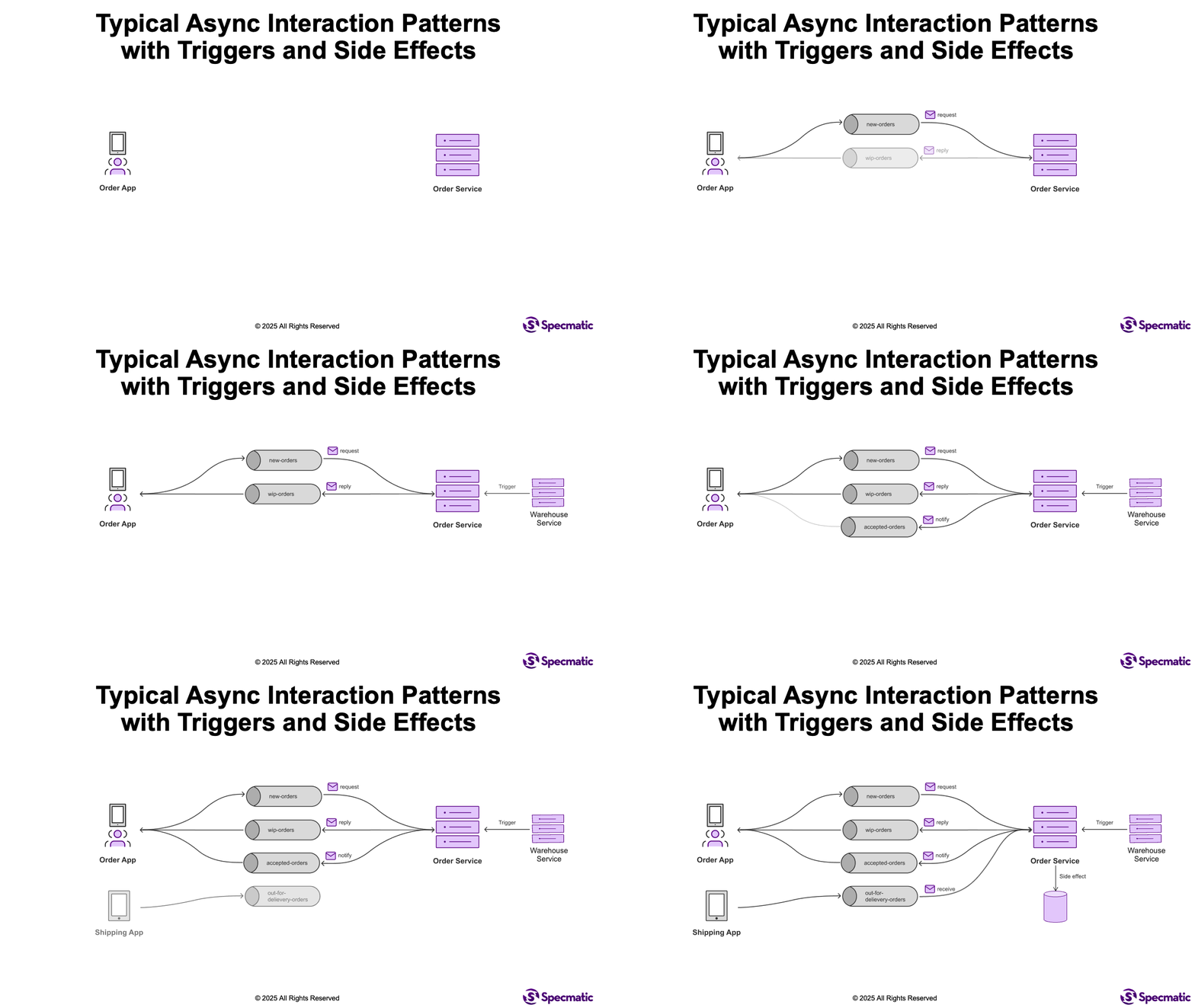
In the above workflow, when the Warehouse Service receives an inventory availability confirmation, it makes an HTTP PUT request on the Order Service to inform that the items are available in stock and the order can be accepted. Then the Order Service will publish a OrderAccepted event on the accepted-orders topic.
Now imagine you want to test if the Order Service correctly publishes the OrderAccepted event when it receives the HTTP PUT request, but you don't have or don't want to depend on the Warehouse Service.
In such cases, we refer to this action of stimulating the Order Service without using its dependencies as a "trigger".
Hence, the expected behavior we are interested in testing is: when we trigger the Order Service by invoking the HTTP PUT request, it should result in an OrderAccepted event being published on the accepted-orders topic.
Side Effects of Event Consumption
Similarly, when the Shipping App publishes an OutForDelivery event on the out-for-delivery-orders topic, the Order Service is expected to consume this event and update the order status to "OutForDelivery" (or "SHIPPED") in the database.
Here, the database update is referred to as a "side effect" of consuming the OutForDelivery event.
Hence, the expected behavior we are interested in testing is: when the OutForDelivery event is published on the out-for-delivery-orders topic, Order Service should correctly update the order status in the database.
Testing Triggers and Side Effects with Specmatic
Specmatic uses Example Files to define concrete scenarios for AsyncAPI operations. These example files can contain before and after blocks to handle triggers and side-effect verifications.
AsyncAPI Specification
Here is a simplified AsyncAPI specification for the Order Service that defines the relevant channels and operations.
asyncapi: 3.0.0
info:
  title: Order Management API
  version: 1.0.0
channels:
  OrderAccepted:
    address: accepted-orders
    messages:
      orderAccepted.message:
        $ref: '#/components/messages/OrderAccepted'
  OrderDeliveryInitiated:
    address: out-for-delivery-orders
    messages:
      orderDeliveryInitiation.message:
        $ref: '#/components/messages/OutForDelivery'
operations:
  orderAccepted:
    action: send
    channel:
      $ref: '#/channels/OrderAccepted'
    messages:
      - $ref: '#/channels/OrderAccepted/messages/orderAccepted.message'
  initiateOrderDelivery:
    action: receive
    channel:
      $ref: '#/channels/OrderDeliveryInitiated'
    messages:
      - $ref: '#/channels/OrderDeliveryInitiated/messages/orderDeliveryInitiation.message'
components:
  messages:
    OrderAccepted:
      name: OrderAccepted
      title: Order accepted by Warehouse
      contentType: application/json
      payload:
        type: object
        properties:
          id:
            type: integer
          status:
            $ref: '#/components/messages/OrderStatus'
          timestamp:
            type: string
        required:
          - id
          - status
          - timestamp
    OutForDelivery:
      name: OutForDelivery
      title: Order is out for delivery
      contentType: application/json
      payload:
        type: object
        required:
          - orderId
          - deliveryAddress
          - deliveryDate
        properties:
          orderId:
            type: integer
          deliveryAddress:
            type: string
          deliveryDate:
            type: string
            format: date
    OrderStatus:
      name: OrderStatus
      title: Order status
      payload:
        type: string
        enum:
          - PENDING
          - INITIATED
          - ACCEPTED
          - SHIPPED
          - DELIVERED
          - CANCELLED
Example Files with Before and After Fixtures
Specmatic supports defining triggers and side effects using Before and After Fixtures directly within example files associated with the AsyncAPI operations.
Triggering an Event (Before Fixture)
The following example file (acceptOrder.json) triggers the orderAccepted operation by making an HTTP PUT request.
{
  "id": "accept-order",
  "name": "ACCEPT_ORDER",
  "before": [
    {
      "type": "http",
      "http-request": {
        "baseUrl": "http://localhost:8080",
        "path": "/orders",
        "method": "PUT",
        "headers": {
          "Content-Type": "application/json"
        },
        "body": {
          "id": 123,
          "status": "ACCEPTED",
          "timestamp": "2025-04-12T14:30:00Z"
        }
      },
      "http-response": {
        "status": 200
      },
      "timeout": "PT30S"
    }
  ],
  "send": {
    "topic": "accepted-orders",
    "payload": {
      "id": 123,
      "status": "ACCEPTED",
      "timestamp": "2025-04-12T14:30:00Z"
    }
  }
}
Verifying Side Effects (After Fixture)
The following example file (outForDeliveryOrder.json) verifies that after an OutForDelivery event is received, the order status is updated to SHIPPED in the application.
{
  "id": "order-out-for-delivery",
  "name": "ORDER_OUT_FOR_DELIVERY",
  "receive": {
    "topic": "out-for-delivery-orders",
    "payload": {
      "orderId": 456,
      "deliveryAddress": "1234 Elm Street, Springfield",
      "deliveryDate": "2025-04-14"
    }
  },
  "after": [
    {
      "type": "http",
      "http-request": {
        "baseUrl": "http://localhost:8080",
        "path": "/orders/456?status=SHIPPED",
        "method": "GET"
      },
      "http-response": {
        "status": 200,
        "body": {
          "id": "$match(exact: 456)",
          "status": "SHIPPED"
        }
      },
      "timeout": "PT10S"
    }
  ]
}
Specmatic Configuration
Specmatic automatically looks for example files in a directory structure that matches your specifications. For an AsyncAPI spec named async-order-service.yaml, place the examples in a folder named async-order-service (relative to your examples directory).
In your specmatic.yaml (or specmatic.json), ensure the spec is listed:
config:
  test:
    async:
      specs:
        - specs/async-order-service.yaml
Running the Tests
When you run Specmatic tests, it will automatically apply the triggers and verify side effects defined in the example files.
[Specmatic::Test] Starting test >> Should send a message on 'accepted-orders' channel.

[Specmatic::Test] Executing 'before' fixture: type=http, method=PUT, path=/orders
[Specmatic::Test] HTTP response received: status=200
[Specmatic::Test] 'before' fixture execution succeeded.

[Specmatic::Test] Waiting for a message on topic 'accepted-orders'...
[Specmatic::Test] Received a message on topic 'accepted-orders' (match=true):
Payload: {
    "id": 123,
    "status": "ACCEPTED",
    "timestamp": "2025-04-12T14:30:00Z"
}

[Specmatic::Test] Result: PASSED
And for side effects:
[Specmatic::Test] Starting test >> Should receive a message on 'out-for-delivery-orders' channel.

[Specmatic::Test] Sending a message on topic 'out-for-delivery-orders'...
[Specmatic::Test] Message published successfully.

[Specmatic::Test] Executing 'after' fixture: type=http, method=GET, path=/orders/456
[Specmatic::Test] HTTP response received: status=200, body={"id":456, "status":"SHIPPED", ...}
[Specmatic::Test] 'after' fixture execution succeeded.

[Specmatic::Test] Result: PASSED
Sample Project
Please have a look at the following sample project to understand how to utilize Specmatic for testing event flows and behaviors in your application:
Conclusion
By leveraging Before and After Fixtures in example files, Specmatic empowers teams to define and test triggers and side effects in event-driven systems. This approach enables comprehensive end-to-end testing of event flows and behaviors without relying on mocks or brittle test harnesses.