Spec Repo View
Spec Repo View expands your specification repositories into their folder and specification structure. It shows how much of each contract surface is covered by provider-side tests and used by consumers through mocks.
The view is available on the Contracts page under the Spec Repo Listing tab.
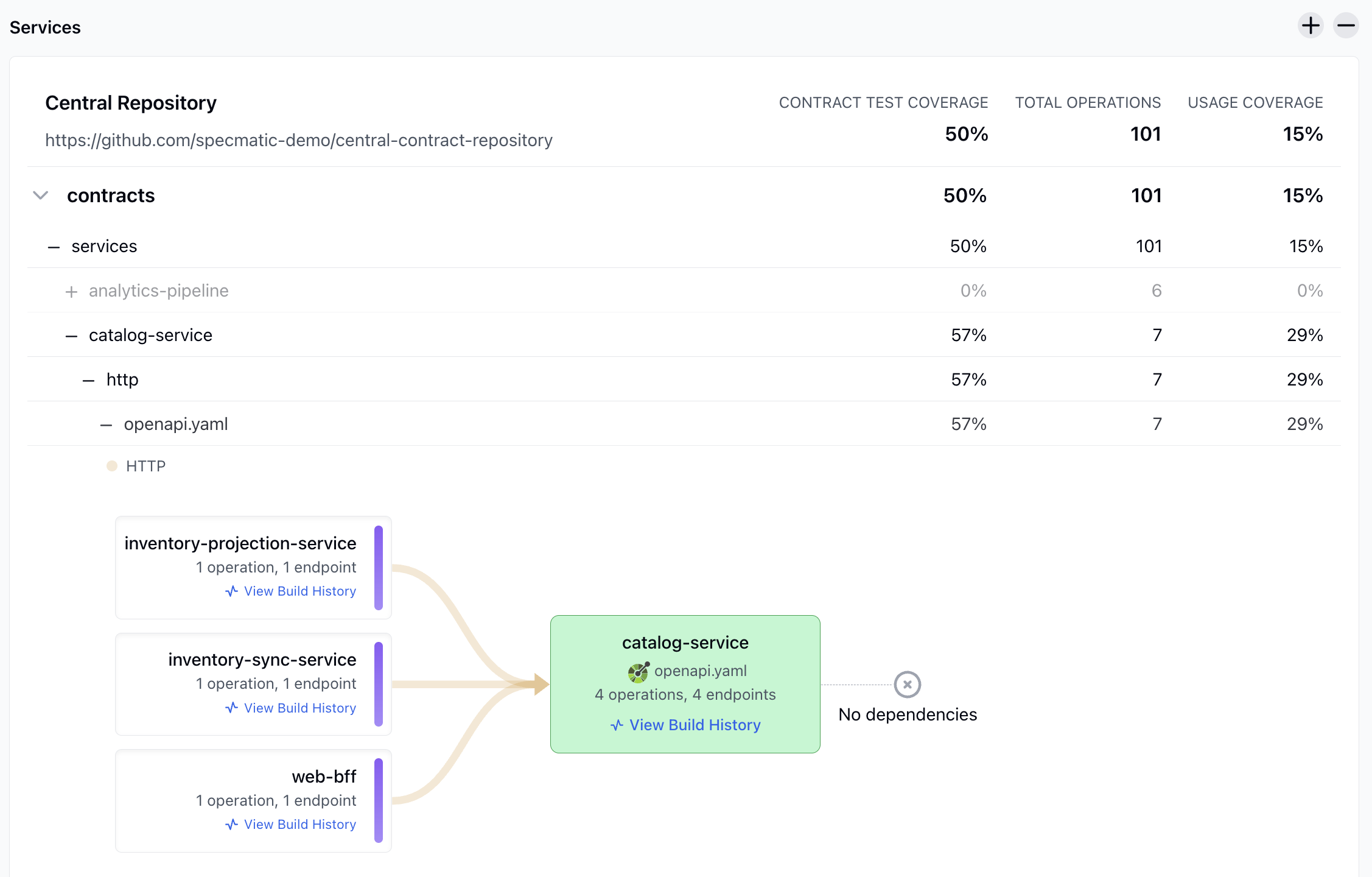
Understanding Spec Repo View
Spec Repo View expands your central contract repository into its folder structure and shows how much of that contract surface is currently covered and used at every level.
In this view:
Contract Test Coverageis the percentage of operations validated by provider-side contract tests.Total Operationsis the total number of contract operations in the repository, folder, or specification.Usage Coverageis the percentage of operations used by consuming services through mocks.
The tree contains the repository, folders, sub-folders, and individual specification files. Folder and repository rows aggregate the specifications beneath them; specification rows show values for that specification.
Contract Test Coverage
At specification level:
Contract Test Coverage = tested operations / total operations in that specification
At folder and repository levels, tested operations and total operations are summed across the specifications in that subtree before calculating the percentage.
Total Operations
This is the total number of contract operations in the selected repository, folder, or specification. Folder and repository values are sums of the operations below that node.
Usage Coverage
At specification level:
Usage Coverage = mocked operations / total operations in that specification
At folder and repository levels, mocked operations and total operations are summed across the specifications in that subtree before calculating the percentage.
Spec Repo View Example
The snapshot shows the following contract and service data:
- The Central Repository contains
101operations. - Overall contract test coverage is
50%. - Overall usage coverage is
15%. - The
catalog-servicefolder contains7operations with57%contract test coverage and29%usage coverage. - Its
http/openapi.yamlspecification contains the same7operations, with4covered and2unique operations used by consumers. - The service panel shows
catalog-serviceimplementing4operations across4endpoints. inventory-projection-service,inventory-sync-service, andweb-bffeach consume1operation and1endpoint fromcatalog-service.- The selected
catalog-servicehas no reported dependencies.
Reading the catalog-service specification row
The http/openapi.yaml row contains 7 total operations. Insights calculates the two percentages from that specification-level total:
- Contract Test Coverage: providers cover
4of the7operations.4 / 7 = 57.14%, displayed as57%. - Usage Coverage: consumers use
2unique operations through mocks.2 / 7 = 28.57%, displayed as29%.
The 7-operation denominator represents the complete specification in the contract repository. It is separate from the service panel's 4 operations, 4 endpoints, which represents the operations currently implemented by the catalog-service provider build.
If the specification sits under a catalog-service folder with no other specifications, that folder shows the same values. Parent folders aggregate all operations, tested operations, and mocked operations beneath them.
The service panel below the tree can show the provider service, consumer services, and dependencies associated with the selected specification. This lets you move from contract-level reporting to service-level relationships without leaving the same view.
For more details about service blocks and their consumers, dependencies, and drawers, see Service View.
What the listing shows
The tree is built from the contract repository structure:
- repository
- folders and sub-folders
- specification files
Each row shows:
- Contract Test Coverage: percentage of operations validated by provider-side contract tests
- Total Operations: total operations in that repository, folder, or specification
- Usage Coverage: percentage of operations used by consuming services through mocks
Folder and repository rows aggregate the values of the specifications below them. Specification rows show values for that specification.
From specifications to services
Selecting or expanding a specification can show the services associated with it:
- the provider service that implements the specification
- consumer services that use it through mocks
- dependencies of the provider service
For the service-level view of the whole ecosystem, see Service View.
Spec Repo View uses the same interaction graph, AsyncAPI channel blocks, and service-block drawers as Service View. In Spec Repo View, the graph is scoped to the selected specification.