Service View
Service View displays an inventory of services represented in your Specmatic Insights data. Each service appears as an expandable entry with its implemented specifications, consumers, and dependencies.
The view is available on the Contracts page under the Service Listing tab.
Service View and Spec Repo View
Service View and Spec Repo View show the same contract ecosystem from different starting points:
- Service View starts with services and shows how they interact with other services.
- Spec Repo View starts with specification repositories and shows the specifications and services associated with them.
Use Service View when you want to understand service dependencies. Use Spec Repo View when you want to inspect repository, specification, or contract coverage details.
How Service View is populated
Insights builds Service View from reports published by your contract workflows:
- A Spec Metadata Report establishes the available specifications and operations.
- Service build reports identify specifications implemented or consumed by each service.
- Insights combines these reports to show provider-consumer relationships and dependencies.
If a service or relationship is missing, verify that the relevant reports were generated and published to Insights.
Service entry
Expand a service to see:
- the service name and repository URL
- repository classification badges, when applicable
- specifications implemented by the service
- local specifications that are not sourced from a repository
- protocol legend for the displayed relationships
- the service interaction graph
Implemented specifications may also provide links to build history and backward-compatibility reports.
Reading the interaction graph
Each expanded service is shown as three areas:
Consumers → Center service → Dependencies
Consumers
Consumers appear on the left. They use the center service's specifications through mocks or other consumer workflows.
The consumer block can show the specifications and operations used, including endpoint, channel, GraphQL, or gRPC counts.
Center service
The center service is the service currently being viewed. Its block shows the implemented specification and the operations or endpoints provided by that service.
Dependencies
Dependencies appear on the right. They are specifications or services consumed by the center service.
The dependency block shows how many operations, endpoints, channels, or protocol-specific operations are used by the center service compared with the available total.
Exploring a service block
A service block represents one service in the interaction graph. Click a service block to open a drawer with details about that service's role in the relationship.
The following example uses GraphQL and gRPC:
web-bffis the center service and implementsschema.graphql.web-frontendis a consumer ofweb-bff.pricing-serviceis a dependency used byweb-bffthrough gRPC.catalog-serviceis a dependency with consumer usage but no provider build available.
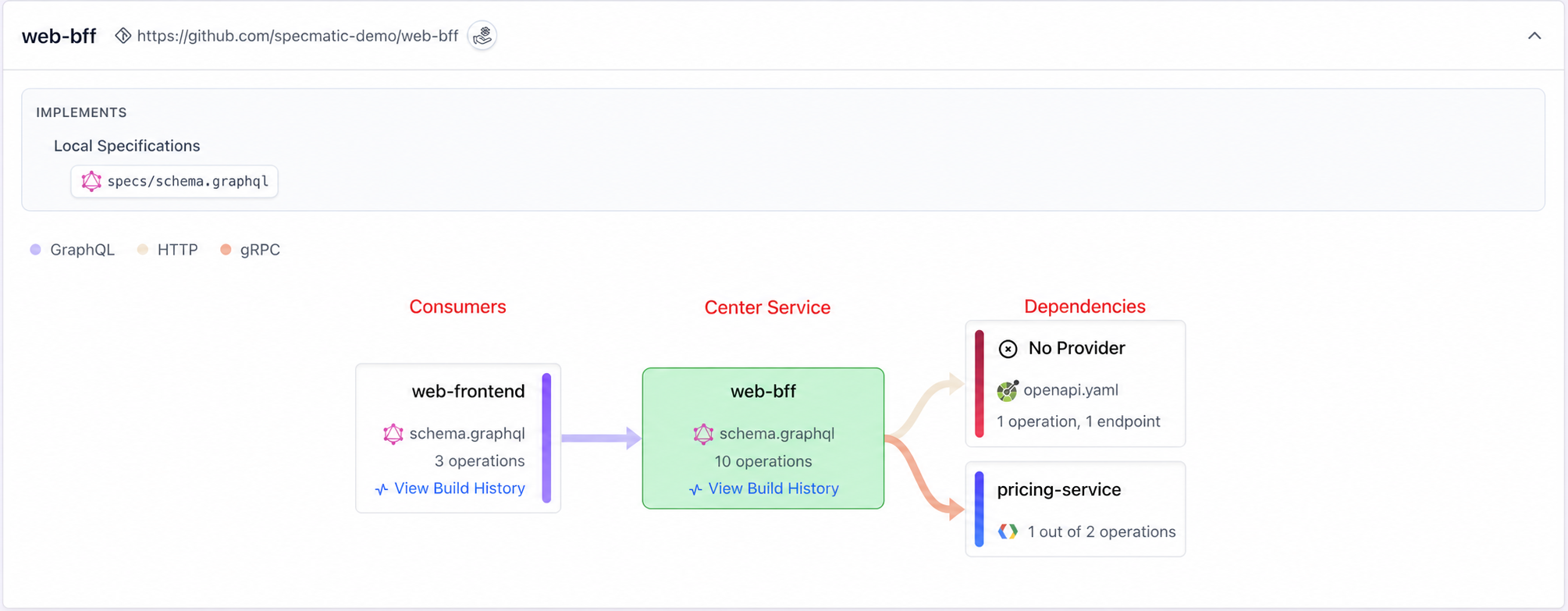
Center service block
The center service block is the service currently being viewed.
In this example, it shows:
web-bffas the selected serviceroot/specs/schema.graphqlas its implemented specification- 10 GraphQL operations
- arrows to its consumers and dependencies
Center service drawer
Select the center web-bff block to inspect its specification, operations, consumers, and dependencies. The drawer also marks unused operations.
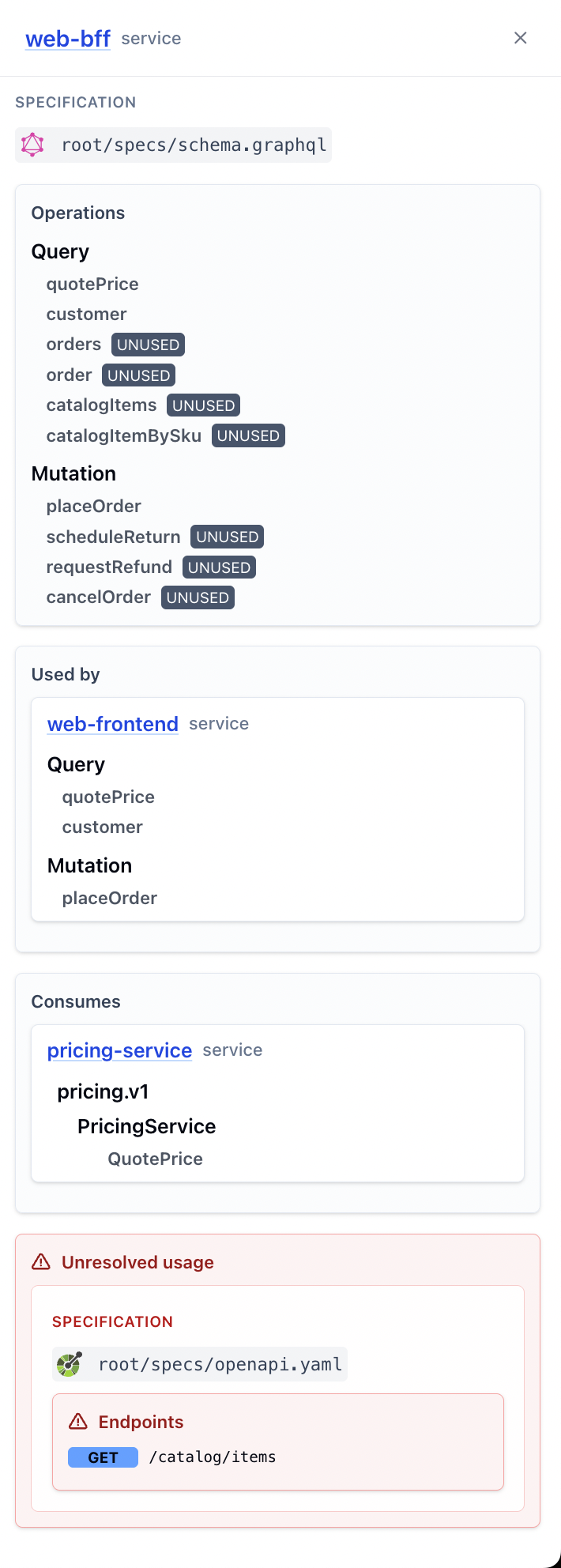
The drawer contains these sections:
- Service header: identifies the selected service as
web-bff. - Specification: shows the implemented local specification,
root/specs/schema.graphql. - Operations: lists the service's GraphQL queries and mutations. Operations without consumer usage are marked
UNUSED. - Used by: shows
web-frontendand the GraphQL operations it consumes fromweb-bff. - Consumes: shows
pricing-serviceand the gRPCQuotePriceoperation consumed byweb-bff. - Unresolved usage: highlights usage reported by a consumer when no matching provider build is available. Here,
GET /catalog/itemsfromroot/specs/openapi.yamlis unresolved.
Consumer service block
The consumer block appears on the left of the center service. It identifies a service that uses operations from the center service.
In this example, web-frontend consumes three GraphQL operations from web-bff.
Consumer service drawer
Select the web-frontend block to see which operations it consumes from web-bff.
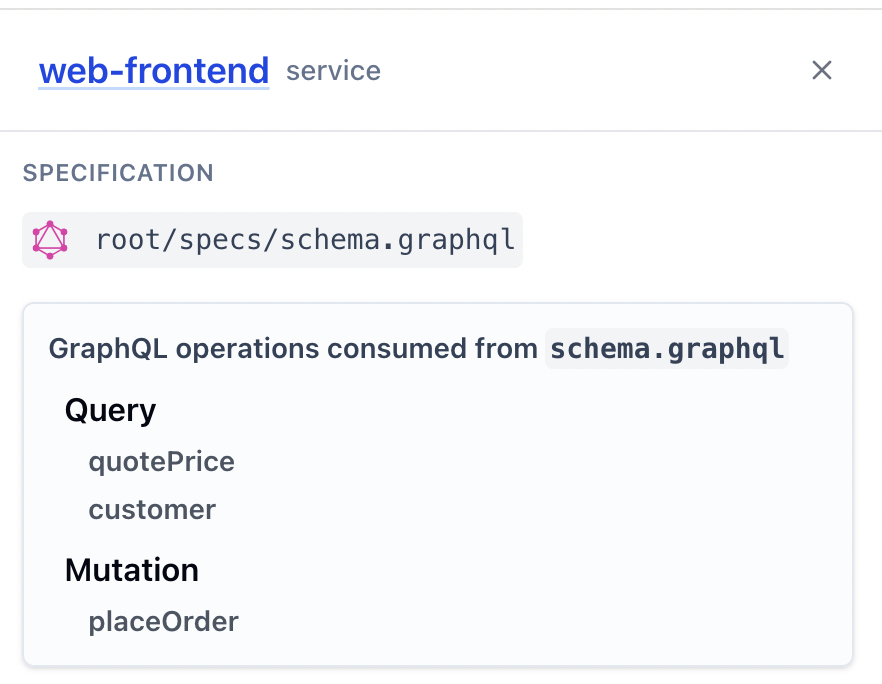
The drawer shows:
- the specification consumed by
web-frontend - the GraphQL operations consumed from that specification
- operations grouped by type, such as
QueryandMutation
Dependency service block
The dependency block appears on the right of the center service. It identifies a service or specification consumed by the center service.
In this example:
pricing-serviceis consumed through gRPC.web-bffuses 1 of the 2 available pricing operations.- the catalog dependency has unresolved usage because no provider build is available.
Dependency service drawer
Select the pricing-service block to see which operations web-bff consumes from that dependency.
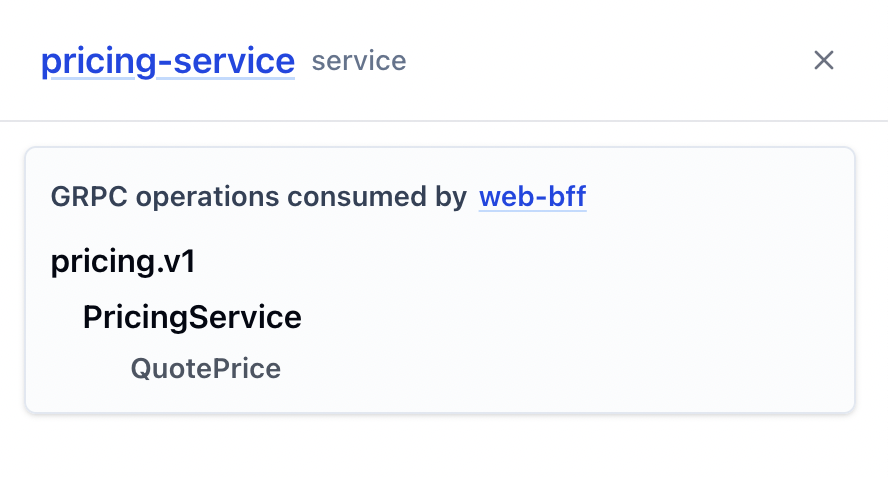
The drawer shows:
- the protocol used by the dependency
- the package and service hierarchy
- the RPC operations consumed by
web-bff
Here, web-bff consumes the gRPC QuotePrice operation from pricing-service.
Together, the blocks and drawers show:
- center service block and drawer: what the selected service implements
- consumer service block and drawer: who uses the selected service
- dependency service block and drawer: what the selected service consumes
AsyncAPI channels
For asynchronous interactions, the graph can include a Channels block between services.
Channels represent the communication path between services. The arrows show message direction, and the channel block can appear on either side of the center service. AsyncAPI relationships may also show operation and channel counts in the service blocks.
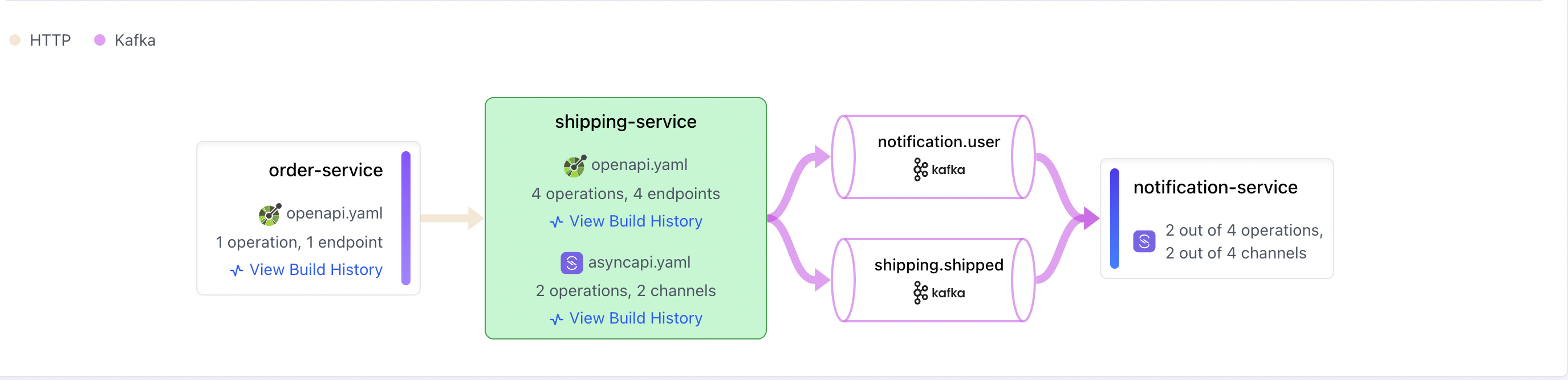
This behavior is the same in Service View and Spec Repo View. The difference is that Service View shows service-level relationships, while Spec Repo View shows relationships in the context of a selected specification.
Protocols and counts
Service View can show relationships for supported protocols, including HTTP, Kafka, AsyncAPI, GraphQL, and gRPC. The legend above the graph identifies the protocol represented by each relationship.
Counts depend on the protocol and the available report data. For example:
- HTTP relationships show operations and endpoints.
- AsyncAPI relationships show operations and channels.
- GraphQL relationships show operations.
- gRPC relationships show RPC operations.
Values such as 2 out of 4 operations mean that the service is using two of the four operations available in that relationship.
Troubleshooting
- Service is missing: confirm that its service build report was published to Insights.
- Specification is missing: confirm that the Spec Metadata Report was published.
- Consumer is missing: confirm that the consumer workflow published its report.
- Provider is missing: confirm that the provider build implements the same specification and published its report.
- Counts are unexpected: check the latest Spec Metadata and service build reports, including the specification and operation identity used by each report.