Central Contract Repository
In a central contract repository setup, all contracts/specifications are stored in one shared repository that acts as the common source of truth for providers and consumers.
Here is a video on this.
File organization
Sample Central Contract Repository
- Package Naming Convention: In the sample repo, the OpenAPI API specifications are organized in a manner similar to a package naming convention. This helps with easy identification of the appropriate files for organizations with large numbers of microservices and API specifications.
- Specification file name: It is helpful to have the version number appended to the API specification file name.
- Extracting common schema: We recommend extracting common schema components to avoid duplication. For example, common.yaml contains only schema components which are leveraged as remote references in api_order_v3.yaml.
- Consistency and standardisation: Commonly used parameters such as
traceIdscan be defined in one place and used across schemas. - Avoid duplication related issues: It is common to miss updating or renaming some parts of a schema. By extracting common schema, we can significantly reduce this risk.
Central Contract Repository Example
In this example, we will use:
central-contract-repositorystores contracts for bothpayment-serviceandorder-servicepayment-serviceprovides its own contract from the central contract repositoryorder-servicealso provides its own contract from the central contract repository, and in this example it consumes the sharedpayment-servicecontract from the same repository
central-contract-repository
The central contract repository stores the shared contracts/specifications that providers and consumers both refer to.
For this example, the relevant contracts are:
contracts/services/order-service/http/openapi.yaml
contracts/services/payment-service/http/openapi.yaml
payment-service
payment-service is the provider in this example.
Its specmatic.yaml points to the shared central contract repository for its own contract/specification:
systemUnderTest:
  service:
    $ref: "#/components/services/paymentService"
components:
  sources:
    centralContractRepo:
      git:
        url: https://github.com/specmatic-demo/central-contract-repository
  services:
    paymentService:
      definitions:
        - definition:
            source:
              $ref: "#/components/sources/centralContractRepo"
            specs:
              - spec:
                  path: "contracts/services/payment-service/http/openapi.yaml"
order-service
order-service is also a provider, but in this example we are looking at it as a consumer of the shared payment-service contract from the central contract repository.
It uses the following shared contract from the central contract repository:
contracts/services/payment-service/http/openapi.yaml
Its specmatic.yaml points to that same contract/specification in the central contract repository:
systemUnderTest:
  service:
    $ref: "#/components/services/orderService"
dependencies:
  services:
    - service:
        $ref: "#/components/services/paymentService"
components:
  sources:
    centralContractRepo:
      git:
        url: https://github.com/specmatic-demo/central-contract-repository
  services:
    orderService:
      definitions:
        - definition:
            source:
              $ref: "#/components/sources/centralContractRepo"
            specs:
              - spec:
                  path: "contracts/services/order-service/http/openapi.yaml"
    paymentService:
      definitions:
        - definition:
            source:
              $ref: "#/components/sources/centralContractRepo"
            specs:
              - spec:
                  path: "contracts/services/payment-service/http/openapi.yaml"
To learn more about specmatic.yaml, see Specmatic configuration.
Repository flow
In the central contract repository model, two different report types are involved:
- a Spec Metadata Report
- a service build report
Spec Metadata Report
Generate the Spec Metadata Report
central-contract-repo-report is deprecated. Use spec-metadata-report instead. The deprecated command remains available as a compatibility alias.
Please ensure the repository Git root is mounted into the container.
Run this from the central contract repository root:
docker run --rm -it \
  -v "$(pwd):/usr/src/app" \
  -v ~/.specmatic:/root/.specmatic \
  -w /usr/src/app \
  specmatic/enterprise \
  spec-metadata-report
This generates the Spec Metadata Report at:
build/reports/specmatic/spec_metadata_report.json
Run specmatic spec-metadata-report --ci with build and repository metadata to generate and publish this report. See Reports Sent to Insights for the JSON payload.
Service build report
Run these steps from the relevant service repositories.
Start the service
Start the service using Docker or your usual startup method:
docker compose up --build
Run the contract test suite
In another terminal:
docker run --rm -it \
  -v "$(pwd):/usr/src/app" \
  -v ~/.specmatic:/root/.specmatic \
  -w /usr/src/app \
  specmatic/enterprise \
  run-suite
For repositories such as order-service that also consume other dependencies, run-suite will start the dependency mocks and then run the contract tests.
Both payment-service and order-service will produce service build reports from their repository roots.
To learn more about contract testing, see Contract Testing.
CI Workflows
PR Process
Pull requests on the central contract repository should run the usual pre-merge checks for contracts/specifications before they are merged.
To learn more about the shared PR process for contract repositories, see PR Process.
Posting reports to Insights
Publish reports to Insights only from workflows that run on push or merge to main.
Central contract repository workflow
For the central contract repository:
- Generate the Spec Metadata Report
- Publish the Spec Metadata Report to Insights
For example:
name: Spec Metadata Reports

on:
  push:
    branches:
      - main

jobs:
  publish-spec-metadata-report:
    runs-on: ubuntu-latest
    steps:
      - uses: actions/checkout@v6

      - name: Save Specmatic license
        run: |
          mkdir -p ~/.specmatic
          echo "${{ secrets.SPECMATIC_LICENSE_KEY }}" > ~/.specmatic/specmatic-license.txt

      - name: Generate and publish Spec Metadata Report
        run: |
          # Ensure the repository Git root is mounted into the container.
          docker run --rm -it \
            -v "$(pwd):/usr/src/app" \
            -v ~/.specmatic:/root/.specmatic \
            -w /usr/src/app \
            specmatic/enterprise \
            spec-metadata-report \
            --ci \
            --build-id="${{ github.run_id }}" \
            --branch-name=main \
            --repo-name="$(gh repo view --json name -q .name)" \
            --repo-id="$(gh api 'repos/{owner}/{repo}' --jq .id)" \
            --repo-url="$(gh repo view --json url --jq .url)"
Service repository workflow
For a provider or consumer repository that points to the central contract repository:
- Start the service
- Run the contract test suite
- Publish the service build report to Insights
For example:
name: Service Build Reports

on:
  push:
    branches:
      - main

jobs:
  publish-service-build-report:
    runs-on: ubuntu-latest
    steps:
      - uses: actions/checkout@v6

      - name: Save Specmatic license
        run: |
          mkdir -p ~/.specmatic
          echo "${{ secrets.SPECMATIC_LICENSE_KEY }}" > ~/.specmatic/specmatic-license.txt

      - name: Start Service
        run: docker compose up --build -d

      - name: Run Contract Test Suite and publish to Insights
        run: |
          docker run --rm -it \
            -v "$(pwd):/usr/src/app" \
            -v ~/.specmatic:/root/.specmatic \
            -w /usr/src/app \
            specmatic/enterprise \
            run-suite \
            --ci \
            --build-id="${{ github.run_id }}" \
            --branch-name=main \
            --repo-name="$(gh repo view --json name -q .name)" \
            --repo-id="$(gh api 'repos/{owner}/{repo}' --jq .id)" \
            --repo-url="$(gh repo view --json url --jq .url)"
How this will look in Insights
How are Spec Metadata Reports processed in Insights?
Every Spec Metadata Report pushed to Insights results in a Spec Repository block being rendered on the dashboard.
Since this model uses one central contract repository, Insights will show only one Spec Repository block for that repository.
The Spec Repository block lists all the specs that were present in the Spec Metadata Report in a directory structure.
How are Service Build Reports processed in Insights?
For each spec, Insights will check if there exists a service build in which this specification is provided/implemented. If found, Insights will display the service repo name as the center block.
Then Insights will check if there exists a service build in which this specification is mocked/consumed. If found, Insights will display the service repo name on the left-hand side and link it to the provider service in the center block.
If the provider service in the center block also consumes other specifications, Insights will display those provider services on the right-hand side and link them to the center block as dependencies.
For the central-contract-repository, payment-service, and order-service example in this page, the following snapshot shows the complete view in Insights:
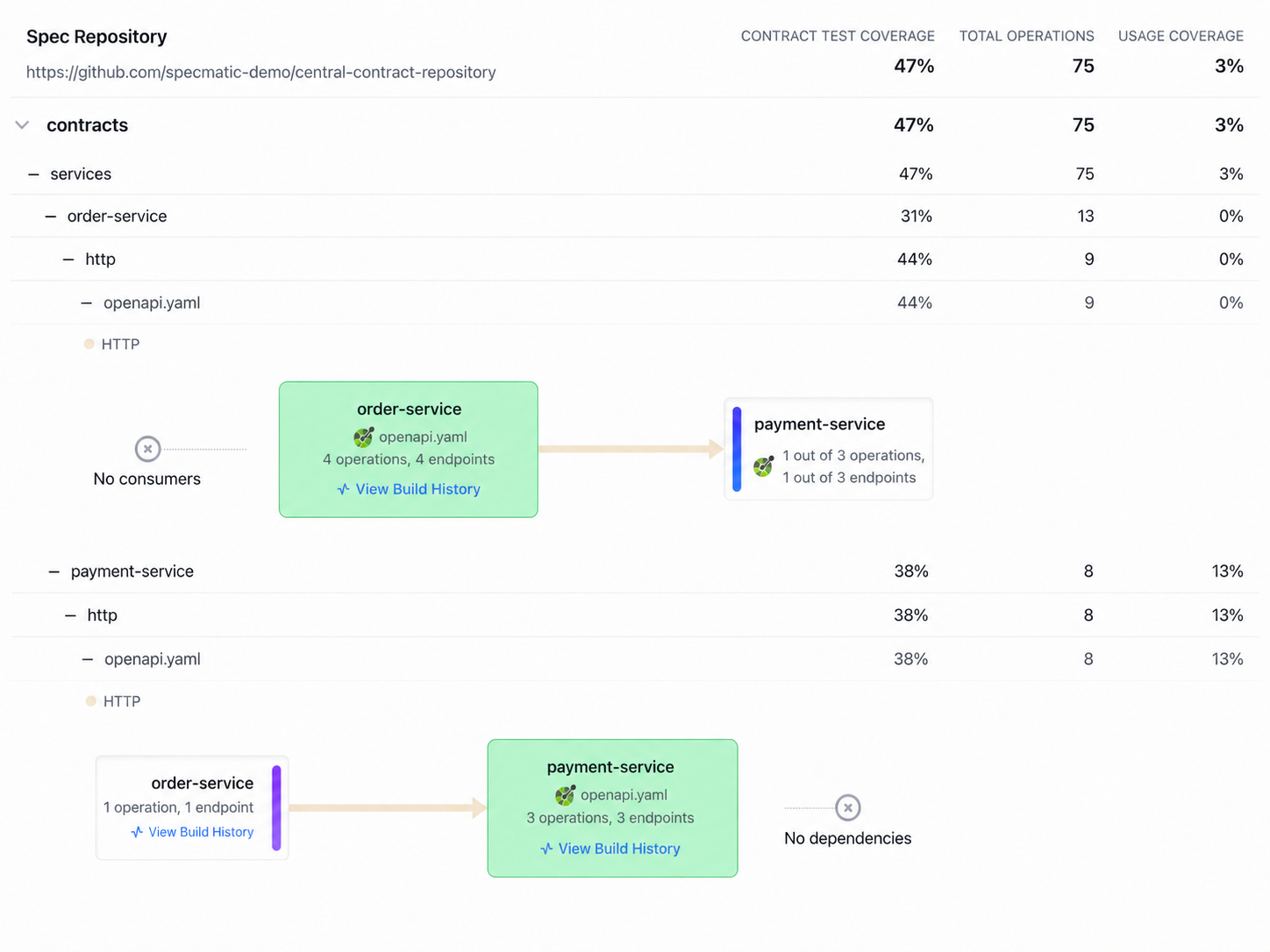
In this view:
- for
order-service, Insights showsorder-servicein the center because it provides theorder-servicecontract/specification, andpayment-serviceon the right-hand side becauseorder-serviceconsumes that dependency - for
payment-service, Insights showspayment-servicein the center because it provides thepayment-servicecontract/specification, andorder-serviceon the left-hand side becauseorder-serviceconsumes it
Troubleshooting
The provider service is missing in Insights
Check that:
- the Spec Metadata Report was generated from the central contract repository and posted to Insights
- the provider contract test suite was run and the service build report was posted to Insights
- the provider repository points to the correct spec path in the central contract repository
The consumer service is missing in Insights
Check that:
- the consumer points to the central contract repository and the correct spec path
- the Spec Metadata Report was generated and posted to Insights
- the consumer contract test suite was run and the consumer service build report was posted to Insights
- the consumer repository points to the same shared contract/specification in the central contract repository