Contract Repositories
Contract Driven Development leverages API Specifications as Executable Contracts to keep both consumers and providers working well with each other. If consumers and providers are referring to different versions of the API Specifications then it is not possible to guarantee this. This sort of deviation can happen when API Specifications are shared over documentation sites, email, or other non-standard mechanisms.
It is critical to have a clear Source of Truth for every contract/specification that all stakeholders can refer to consistently.
Here is a video on this.
Treat Contract as Code
API Specifications are code, and they are best stored in a version control system such as Git. This way we can leverage the version control system as a way to collaborate between all stakeholders through mechanisms such as Pull Requests, Merge Requests, etc.
There are three common repository models:
Central Contract Repository
In this model, all contracts/specifications are stored in one central contract repository.
Providers and consumers both point to that shared repository.
To learn more, see Central Contract Repository.
Federated Repositories
In this model, contracts/specifications are distributed across multiple contract repositories instead of one central contract repository.
These repositories still contain contracts/specifications only. They can be organized by department, business unit, domain, or any other boundary that makes sense for the organization.
To learn more, see Federated Repositories.
Provider Repositories
In this model, contracts/specifications are stored directly in the provider service repositories.
Consumers point directly to provider repositories instead of a separate contract-only repository.
To learn more, see Provider Repositories.
External Examples
If you want to keep examples outside the specification file, add them in a directory named {specification-name}_examples at the same level as the specification file.
For example, if the specification file is named employee_details.yaml, Specmatic will look for examples in:
employee_details_examples/
These examples can then be validated as part of your pull request workflow.
To learn more, see External Examples.
Pull Request / Merge Request Process
Regardless of how contracts/specifications are organized, teams typically use a pull-request based workflow to review, validate, and evolve them.
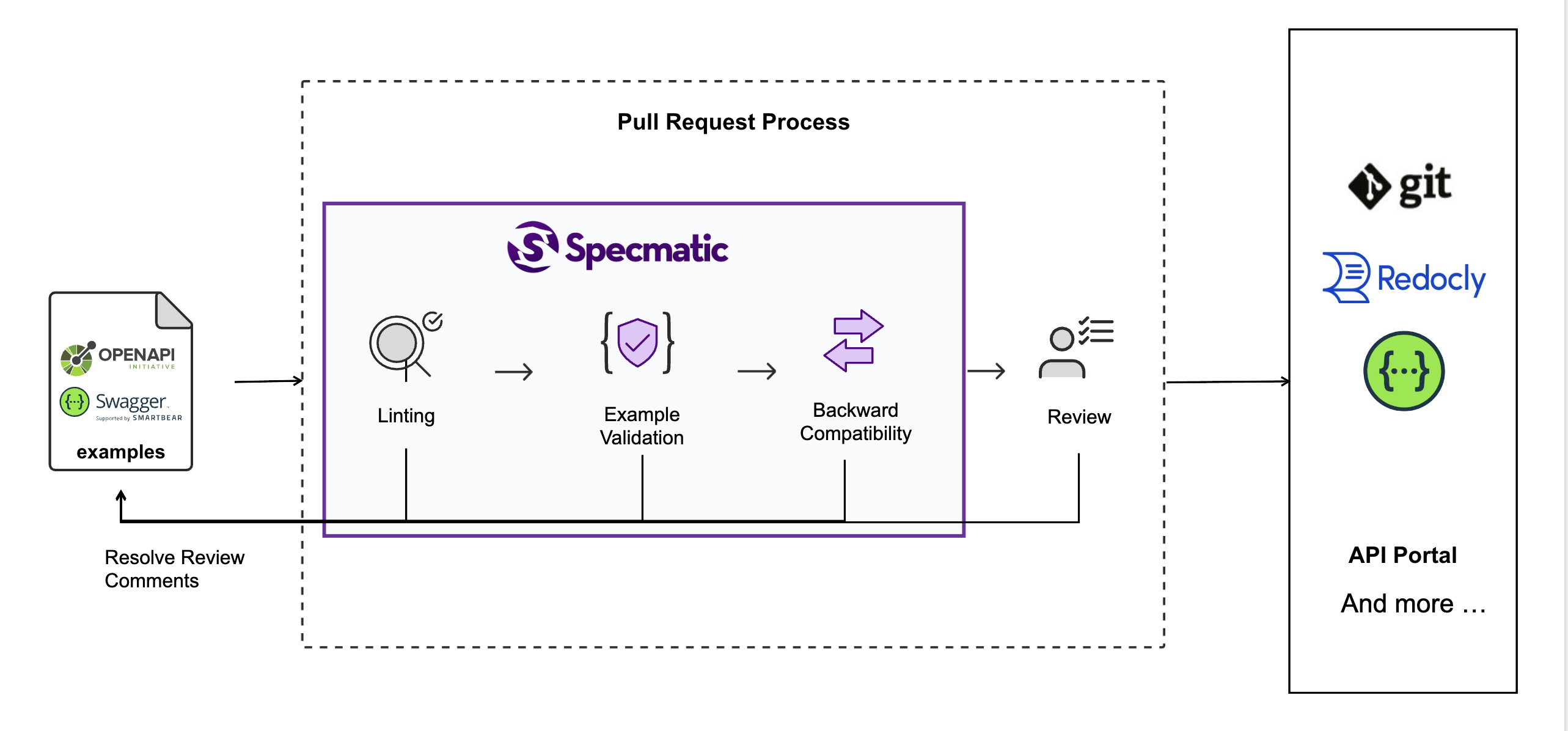
For all three repository models, it is a good idea to prevent direct commits to the default branch and require all changes to go through a pull request or merge request.
Pre-merge checks
Typical pre-merge checks include:
- linting
- example validation
- backward compatibility checks
These checks help teams catch problems early, before contract changes are merged and consumed more widely.
See Specmatic Linter to understand what linting checks, then use the Linter CI/CD guide to add it to a pull-request workflow.
CI workflow for pull requests
Add these steps to your pull request workflow so that contract/specification changes are linted, validated, and checked for backward compatibility before they are merged. For example:
name: CI

on:
  pull_request:
    branches:
      - main

jobs:
  build:
    runs-on: ubuntu-latest
    steps:
      - uses: actions/checkout@v6
        with:
          fetch-depth: 0

      - name: Save Specmatic license
        run: |
          mkdir -p ~/.specmatic
          echo "${{ secrets.SPECMATIC_LICENSE_KEY }}" > ~/.specmatic/specmatic-license.txt

      - name: Run Specmatic Linter
        run: |
          docker run --rm \
            -v "$(pwd):/usr/src/app" \
            -v "$HOME/.specmatic:/root/.specmatic:ro" \
            -w /usr/src/app \
            specmatic/enterprise \
            lint 'path/to/your/specs/*'

      - name: Validate Examples
        run: |
          docker run --rm \
            -v "$(pwd):/usr/src/app" \
            -v "$HOME/.specmatic:/root/.specmatic:ro" \
            specmatic/enterprise \
            examples validate --specs-dir=path/to/your/specs

      - name: Run Backward Compatibility Check
        env:
          SPECMATIC_LICENSE_CONTENT: ${{ secrets.SPECMATIC_LICENSE_KEY }}
        run: |
          docker run --rm \
            -v "$(pwd):/usr/src/app" \
            --user $(id -u):$(id -g) \
            -e SPECMATIC_LICENSE_CONTENT \
            specmatic/enterprise \
            backward-compatibility-check --base-branch=origin/main
The exact file globs and spec directories will depend on your repository layout, but the workflow shape remains the same.
Collaborating over API Design
Contract repositories help all stakeholders collaborate over API design. A pull request or merge request gives teams a place to propose, discuss, validate, and review contract changes before they become part of the shared contract surface.